Pages

Showing posts with label Store. Show all posts

Tuesday, 23 October 2012

How to Test Your Windows 8 App Before Submitting to the Store

How to Test Your Windows 8 App Before Submitting to the Store
It’s always a good idea to test your application before submitting it to the store. The Windows Application Certification Kit (WACK) tool can save you from failing the early automated tests.

The first thing you’ll want to do is uninstall any existing build of your application. This is important because the WACK tool may fail if a previous debug build is still installed on the system. To uninstall your app, find it on the Start experience, right-click and choose ‘Uninstall’.

Read More

Saturday, 20 October 2012

The Windows Store App Lifecycle

The Windows Store App Lifecycle
Windows 8 is changing how and when applications run, and you’ll want to understand the nuances of the new application lifecycle so you can build apps that respond as they should at every point. Apps that conform to the Microsoft lifecycle management guidelines offer a better experience for the user, especially on small devices where memory and battery conservation are warranted.

Read More

Sunday, 14 October 2012

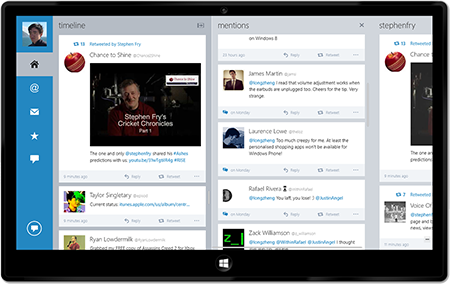
Officially announcing MetroTwit for Windows 8, now available in the Windows Store

Officially announcing MetroTwit for Windows 8, now available in the Windows Store
The anticipated major update to MetroTwit for Windows 8 has just been certified and is now rolling out to Windows 8 users around the world for customer download. You can see the details in the Windows Store here.

Read More on MetroTwit Blog

Thursday, 20 September 2012

What is the difference between a company vs. individual account for the Windows Store?

When you register to develop apps for the Windows Store, you have the option to register for a company or an individual account.  What are the major differences between them?

Read More

Monday, 17 September 2012

MetroLog - A lightweight logging system designed specifically for Windows Store and Windows Phone 8 apps


MetroLog is a lightweight logging framework designed for Windows Store and Windows Phone 8 apps. Although the API is based on NLog and log4net, the intention is that it's a very basic logging system.

The need for it to be basic comes from the fact that the Windows Store apps API surface area intentionally limited for very specific applications. This project came out of the fact that porting NLog to Windows Store apps is difficult because of it's incredibly rich feature set, most of which is not workable in Windows Store apps.

Read More

Sunday, 16 September 2012

Inspecting local and roaming settings for Windows 8 Store app

Inspecting local and roaming settings for Windows 8 Store app
ApplicationDataContainer class supports saving of complex hierarchies of local and roaming settings. Sometimes there is a need to verify saved values but unfortunately Windows 8 development toolset doesn’t include any settings inspector. This post describes a method for inspecting settings manually.

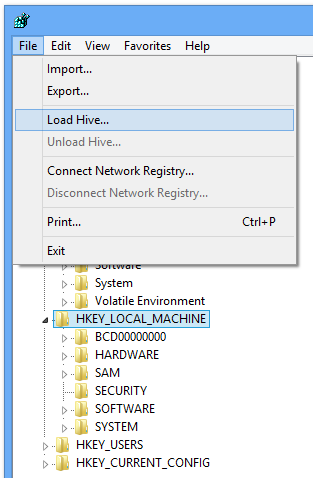
Application settings are stored in C:\Users\<user_name>\AppData\Local\Packages\<package>\Settings\settings.dat. settings.dat is a Windows NT registry file (REGF) and includes local and roaming settings. This file format, REGF, also known as Registry Hive File, is supported by Registry Editor.

To open settings file, close your app and open Registry Editor. Than select HKEY_LOCAL_MACHINE or HKEY_USER and open Load Hive dialog from File menu.

Read More

Saturday, 15 September 2012

Windows 8: Windows Store apps and the WebView control


I recently started looking into creating a simple Windows 8, Windows Store app, that would contain a browser window and a setting somewhere to allow the URI to be modified.

The app itself is quite simple in concept so I figured it would be a breeze to implement for Windows 8.

To display a web page I needed to use a WebView control and I simply set the Source property to the desired Uri.

Read More

Friday, 14 September 2012

Building Data and Services for Windows 8 Apps


In this post, I'm going to kick off a series in which I'll walk through the creation of a back-end service for a Windows 8 app. This first post will provide an overview of the series, and introduce a couple of potential technologies you can use to build your back-end services.

The Challenge
As an example of a scenario that might merit a nicely abstracted back-end service, I'm going to create a simple leaderboard service that can store and retrieve high scores and win/loss/tie stats for a variety of games. Since it's where I've spent the majority of my time lately, I'm going to focus on games built with HTML and Javascript, but the platform choices I'm going to describe will work just as well for games and apps build with C# or VB and XAML..

Read More

Thursday, 13 September 2012

Integrating your cloud service with the file picker contracts


Integrating your cloud service with the file picker contracts
In the past, users organized, shared, and maintained their documents, photos, videos, and music on the local PC. But the cloud is quickly providing users with much richer ways to access, experience, and manage the files they care about. Windows 8 embraces these new scenarios by allowing you to deeply integrate cloud services directly into your apps to create completely new experiences that were not possible before.

You can see many of these scenarios highlighted in the SkyDrive app which uses the file picker contracts. The file picker contracts are designed to make user’s documents, photos, videos, & music stored in your app available to all other Windows 8 apps. In this post, we use the SkyDrive app (which implements all three of the file picker contracts as introduced in Connecting your apps, files, PCs and devices to the cloud with SkyDrive and Windows 8) to show you:

Read More

Searching in Windows 8 Thorough Charm Bar


Searching in Windows 8 Thorough Charm Bar
Windows 8 Store Applications can take advantage of the shared “Charms” that you see when you swipe in from the right edge of your Windows 8 device (or press Win-C).  The top charm is searching and it provides tremendous functionality at relatively little programming effort.

When you click search Windows 8 assumes you want to search the current application if that application has registered a Search “contract.”  If it has not, Windows 8 will assume you want to search the applications, as shown in the figure (click on the figure for full size).

Read More

Code Snippets for Windows Store Apps


In partnership with the Visual Studio team, we are launching Code Snippets for Windows Store apps, a collection of around 60 IntelliSense Code Snippets for common Windows Store app programming tasks. The snippets are available for Visual Basic, C#, C++, and JavaScript developers.

For example, if you don’t know how to copy a file in JavaScript or C++, just right-click, select Insert Snippet, select the code snippet, and it will automatically add the code to your Windows app as shown in the screenshots below.

Read More

Wednesday, 12 September 2012

Windows 8 App Challenge: Microsoft Australia giving away 50 x $1,000 Windows RT tablets


Windows 8 App Challenge: Microsoft Australia giving away 50 x $1,000 Windows RT tablets
Australian developers, start your Windows 8 app engines.

Attendees of the Microsoft TechEd Australia 2012 conference over the next couple of days will have the opportunity to win one of 50 Windows RT tablets for submitting three Windows 8 apps to the Windows Store by October 1.

The $50,000 AUD contest (50 x Windows RT tablet each worth $1,000) starts today on September 10 and closes three weeks later on October 1. During this time, the developer must create an Australian Windows Store account, submit three Windows 8 applications, complete a virtual lab session and email Microsoft Australia with their apps.

Read More

The Windows Store Submission Process


The Windows Store Submission Process
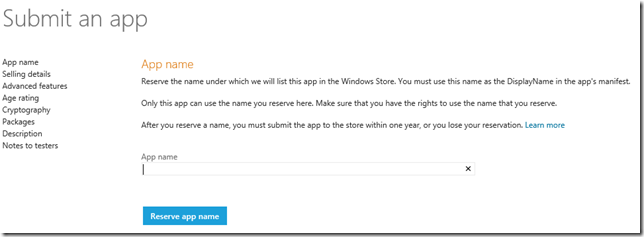
I recently got access to the Windows Store, and submitted my first app, “The game of Bao”, a simple and fun board game I learned when we visited Malawi, Africa during our honeymoon (any money the game makes will be donated back to an organization working on improving the lives of the kids that taught us this game, so please be kind and play it a lot and give some great reviews :-).

I recorded the steps that I have had to go through so you can see what you need to have ready if you need to submit an app yourself.

Read More

Wednesday, 5 September 2012

Automating the testing of Windows 8 apps


Automating the testing of Windows 8 apps

In the blog post for testing Windows Store apps, we’ve primarily covered what to test your apps for. While you can manually execute the verification areas we’ve discussed in the previous post, it is more efficient to automate some of these verification areas. Automating the verification of your app has many benefits. Automated testing saves time and money that you’d otherwise spend doing manual testing. Once created, automated tests can be run over and over again at minimal cost and are much faster than manual tests. This helps ensure that the quality of your app stays high and the cost stays low with every new release of the app. Automated testing also improves the accuracy of the verification because even the most conscientious tester might make mistakes during tedious manual testing.

In this post, we provide some tips and techniques on automating the testing of Windows 8 apps. Keep in mind that automated testing is a powerful technique and it requires some initial investment to reap the full rewards. The advice and examples in this post are meant to get you started, but you’ll need to build and maintain your own infrastructure on top of them. If you are looking for some lighter weight testing techniques, check out the recent blog on testing apps with Visual Studio.

Read More

Tuesday, 4 September 2012

MSDN Webcast Series - Building Windows 8 Metro Style Apps

MSDN Webcast Series - Building Windows 8 Metro Style Apps

Catch this on-demand MSDN webcast series to learn about the new platform for building Windows 8 Metro style applications. Get an understanding of the platform design tenets, the programming language choices, and the integration points with the operating system and across Metro style apps.

  • Designing apps with Metro style principles and the Windows personality
  • Building Metro style apps with XAML: What .NET developers need to know
  • What HTML developers need to know about coding Windows 8 Metro style apps
  • Win as One: How Contracts in Windows 8 Help You Build a Killer Metro App
  • Bring Your Windows 8 Metro Style Apps to Life with Tiles and Notifications
  • Introduction to the Windows 8 platform and the Windows store
  • Building Windows 8 Metro style casual games using HTML 5

Read More @ channel9

Using vector data for AppBar icons in XAML


Using vector data for AppBar icons in XAML
I was helping a friend today doing some over-the-shoulder code review and suggestions for his Windows app he’s writing for the store.  In doing this I asked a question about how to perform a certain action.  He indicated that he put those functions in the AppBar and was it not obvious I was supposed to use them.  I looked at the AppBar again and found out why I wasn’t drawn to them.  First, the labels he used weren’t descriptive to me and relied too much on me looking at the actual icon.  Second, however, is that when I hovered over them I received no visual feedback I was expecting and immediately thought they were just disabled (the color was slightly gray as well which probably didn’t help this).

I mentioned these to him and noted he should use the AppBarButtonStyle base definition that comes in the Visual Studio templates as a guide and just set the appropriate content.  He proceeded to let me know that he received the vector data from Syncfusion’s Metro Studio product.  We then began to examine the vector data.  Metro Studio is doing probably too much than it needs to for AppBar button definitions.  To be fair, it serves a goal to get Windows UI style icons for the developers in XAML form.  This is great!  However, if my intention is to use them for AppBar buttons, then it is doing too much.  It led me down a path to see how easy it was to use vector data with the default AppBarButtonStyle definition.  Turns out it wasn’t as simple as I thought.  Let me first explain the core issue then walk through a step on how to do this with vector data.

Read More

Using the Microsoft Ad SDK in Windows 8


Using the Microsoft Ad SDK in Windows 8  One of the best ways to make money with Windows 8 is to display ads in your Windows Store app using the Microsoft Advertising SDK.  Here’s how you can get started.

Prerequisites: You’ll need Windows 8 RTM and Visual Studio 2012.  A free 90 day evaluation edition of Windows 8 Enterprise is available, and VS2012 Express Edition is completely free.

Start by downloading and installing the Microsoft Advertising SDK.  At the time this post is being written, Windows 8 RTM has been released, but the Microsoft Ad SDK is still in beta at version 6.1.0813.1.  It works with Windows 8 RTM, but not all features are supported yet.  The RTM version of the Microsoft Ad SDK is expected in mid-September.

Read More

Friday, 31 August 2012

Windows 8 AppFest In India (Bengaluru)


Microsoft India proudly presents, Windows 8 AppFest, the world’s largest coding marathon for building great apps. Bring your vision, laptop, and your favorite coding pajamas to AppFest for a chance to transform your dream into a download. Starting on September 21st and continuing for 18 hours, thousands of talented programmers and designers will gather in Bengaluru to bring their dreams to life. Onsite staff will be available to assist AppFest participants with preparing their apps for eventual submission to the Windows Store. You will have the opportunity to have our staff run your app through a series of quality checks in addition to discussing techniques to make your app even better.

Register now


  •     This is a limited seat, invite-only event.
  •     AppFest is FREE.
  •     Registration for AppFest is just a confirmation of your interest in attending the event.
  •     To qualify to attend AppFest, you must submit a description of your app. You may choose from any of the 20 existing Windows Store categories. An invitation will be sent to you as a confirmation.


Here is the venue details:
Karnataka Trade Promotion Organisation,
121, EPIP Industrial Area, 5, Whitefield,
Bengaluru - 560066, Karnataka

Windows 8 AppFest Official Site

Getting Started: XAML Authoring With Blend For VS 2012


Getting Started: XAML Authoring With Blend For VS 2012

Now that you have your copy of Visual Studio 2012 including Blend, you must be raring to go and explore the world of Windows 8 development. We hope this post helps all the C#/VB & C++ junkies out there get started pronto on creating amazing apps for the Windows Store.

Who doesn’t like food? Trying to find the perfect recipe to cook for dinner is a decision we battle every day, so one of our sister teams in Microsoft had created this awesome Contoso Cookbook sample app. For the purposes of this post we will take this much loved sample application already oozing with design goodness and add a bit more styling and flair to it.

Download the Contoso sample app uploaded to accompany this tutorial.

Read More...

Popularity of C# vs. JS vs. C++ for Windows 8 apps


Popularity of C# vs. JS vs. C++ for Windows 8 apps A few months ago I was speaking with a reporter and was asked which development model the industry was gravitating toward for Windows 8 apps. My impression was that Xaml + C# appeared to be strongest out of the gate but only time would tell if JavaScript+HTML would slowly close the gap.

So far, this hasn’t happened. C# (and VB) + Xaml development has held its ground as by far the most popular development model for Windows 8 Metro Store apps. In fact, preference is almost 3 to 1 over JavaScript + HTML.

Since early April, I’ve been taking random snapshots of the number of posts on the MSDN Windows 8 development forums and here are the results

Read More...
Web Informer Button