Pages

Showing posts with label CodePlex. Show all posts

Tuesday, 16 October 2012

Callisto Dialog Helpers for Caliburn.Micro WinRT

Callisto Dialog Helpers for Caliburn.Micro WinRT
Callisto is excellent open source UI Control library for the Windows 8 Store apps. Caliburn.Micro is a powerful framework for building Windows Phone, Silverlight and Windows 8 Store apps. These helpers make it easies to combine Caliburn.Micro with the Callisto's dialogs.

Content
  • Helper for displaying settings dialogs on the Settings charm
  • Helper for displaying normal dialogs all around the screen
Read More
Get Library on CodePlex

Saturday, 6 October 2012

The HealthVault Windows 8 SDK is now available

The HealthVault Windows 8 SDK is now available
HealthVault is the single repository of your entire medical life – across doctors, clinics, and years. HealthVault is a secure repository for you and your family’s medical and fitness data. It can be, at your control, shared with health providers or anyone you trust – but only if you want to. It can be integrated into applications and technology.

The library is for both JavaScript and C# applications.

Read More

Thursday, 4 October 2012

Modern UI Data Visualization Toolkit

Project Overview :
The main perpose for this is to build a set of reusable controls for Windows 8 Modern UI Development The Primary Release will contain the PieChart that I developed earlier on http://blogs.msdn.com/b/metroapps

Main Controls
- Pie Chart
- ColumnChart
- Line Chart

With support of Multi Series and Stacked Charts

Samples in Action:
http://download-codeplex.sec.s-msft.com/Download?ProjectName=modernuitoolkit&DownloadId=491376

Read More on CodePlex

Friday, 14 September 2012

Adding and Editing WinRT Behaviors with Blend

I am a huuuuuuge fan of Behaviors (and Actions and Triggers) for Silverlight and WPF. I have been very disappointed when WinRT turned out not to support them.

Luckily, Joost Von Schalk created WinRTBehaviors on CodePlex (also available on NuGet). But his solution still lacks any Blend support. I have not been able to reproduce the full Blend behavior editing experience, but I managed to take the first baby-step that at least saves you from creating Behaviors from code.

Read More

Wednesday, 29 August 2012

Creating a WinRT component using C++/CX Part 2: Adding a custom Direct2D effect to DeForm


Creating a WinRT component using C++/CX Part 2: Adding a custom Direct2D effect to DeForm
The previous article introduced the DeForm Library: A WinRT component that used Direct2D to apply filters on a picture.

You can download DeForm from CodePlex

This article will show you how to use the Direct2D effect pipeline to create a custom Direct2D effect. This effect will try to apply some kind of Polaroïd effect by applying many filters in a row:

  • Black&White
  • Sepia tone
  • Saturation
  • Brightness

To do so, you have to create a COM component for Direct2D (handling reference counting and interfaces querying):

Read full article here

ObjectStorageHelper : Generic Object Storage Helper for Windows RTM Now Available


Project Description
ObjectStorageHelper<T> is a Generic class that simplifies storage of data in WinRT applications while still maintaining the Async principles of Windows 8 apps

Overview
While exploring WinRT I came up with this, ObjectStorageHelper<T>, a Generic class that wraps (and greatly simplifies) use of the RoamingFolder, TemporaryFolder & LocalFolder storage folders within the ApplicationData class.

With ObjectStorageHelper<T> saving and loading an object to/from disk is now just a simple method call.

I blog about ObjectStorageHelper<T> at ObjectStorageHelper

Restrictions
Under the covers ObjectStorageHelper<T> uses XML Serialization hence T needs to be an object that can be serialized as XML. There is a useful thread on Stack Overflow Using .Net what limitations (if any) are there in using the XmlSerializer? that talks about those restrictions better than I ever could.

Check it out on CodePlex

Tuesday, 28 August 2012

Physics Helper XAML For WinRT


Physics Helper XAML For WinRT
Project Description

Physics Helper XAML allows you to easily create 2D physics based games and simulations for Windows 8, Windows Phone 7 and Silverlight 5 using C# or VB. It is a port of the Physics Helper and uses the Farseer Physics Engine.

Why a Separate Version?

When I began porting the Physics Helper project to Windows 8, I realized that there were many breaking changes in WinRT and missing functionality such as Behaviors. It was much simpler to create a new version for Metro/WinRT and then port that new version to Windows Phone and other platforms. I think that the end result is much simpler and cleaner, as an added bonus!

For more details and how to get started, see the Documentation page.
Download Physics Helper XAML 1.1.0.0

Caliburn.Micro MVVM Framework

Caliburn.Micro MVVM FrameworkCaliburn.Micro is a small, yet powerful framework, designed for building applications across all Xaml Platforms. With strong support for MVVM and other proven UI patterns, Caliburn.Micro will enable you to build your solution quickly, without the need to sacrifice code quality or testability.

Download from here and it's also available at NuGet


Using OData in Windows 8 Apps for Windows 8 RTM


Using OData in Windows 8 Apps for Windows 8 RTM The following is an excerpt from Chapter 6 of my book, Building Windows 8 Apps with C# and XAML.

The Open Data Procotol (OData) is a web protocol used for querying and updating data. It is a REST-based API built on top of Atom that uses JSON or XML for transporting information. Windows 8 applications have native support for OData clients once you download and install the client from here

To access OData services, you simply add a service reference the same way you would for a SOAP-based web service. A popular OData service to use for demonstrations is the Netflix movie catalog. You can browse the service directly by typing http://odata.netflix.com/catalog/ into your browser. In most browsers you should see an XML document that contains various tags for collections you may browse. For example, the collection referred to as Titles indicates you can browse all titles using the URL, http://odata.netflix.com/catalog/Titles.

Read full article here

Monday, 27 August 2012

Getting Started with Windows 8, MVVM Light and EventToCommand


Getting Started with Windows 8, MVVM Light and EventToCommand
Now that Windows 8 and Visual Studio are in RTM I wanted to put together a quick entry for those Windows Phone developers making the transition to Windows 8 development with their MVVM Light skills.

Laurent Bugnion, is the creator of the MVVM Light toolkit and I, as well as many others, have been using this for Windows Phone development for a while now.  I am porting on of my applications to Windows 8 and wanted to take the knowledge of this toolkit to the new platform hoping that there were either some new enhancements and/or not many changes so that I could just go.  Well that was the deal.


The latest installer for the toolkit, "MVVM Light Toolkit V4 RTM", is available from CodePlex
Read full article here

Thursday, 23 August 2012

LINQ to Twitter

LINQ to TwitterLINQ to Twitter is an open source 3rd party LINQ Provider for the Twitter micro-blogging service. It uses standard LINQ syntax for queries and includes method calls for changes via the Twitter API.

Supports .NET 3.5, .NET 4.0, Silverlight 4.0, Windows Phone 7.1, Client Profile, and Windows 8.

100% Twitter API coverage.

LINQ to Twitter Samples contains example code for using LINQ to Twitter with various .NET technologies. Downloadable source code also has C# samples in the LinqToTwitterDemo project and VB samples in the LinqToTwitterDemoVB project.


Downalod from here 

Tuesday, 14 August 2012

Player Framework: an open source component of the Microsoft Media Platform For Windows 8 Apps


The Microsoft Media Platform team has released the beta version of a Player Framework for Windows 8 Metro Style Applications. If you are building media applications for Windows 8 this is for you.

What is the Player Framework? The Player Framework is an open source video player available for Silverlight, HTML5, Windows Phone, Xbox, and now, Windows 8 Metro-style applications.


This framework allows you to add advanced video playback features to your Metro style application using either the HTML/JavaScript or XAML/C# app models.
The beta release focuses on core playback scenarios and baseline functionality. In our next release we will add more advanced features including SMPTE-TT/TTML/WebVTT closed captioning support, Advertising support via MAST, VAST, VPAID, and Microsoft's Universal Ad Client, and a number of other advanced features.

Download Player Framework for Windows 8 Metro (BETA)
Download Smooth Streaming Client SDK Beta

Documentation: Getting started with an HTML/JS Player / XAML Player

TwitterRt - Tweet from C#/XAML Windows Metro Apps


TwitterRt - Tweet from C#/XAML Windows Metro AppsMy goal is to make tweeting from a C# Metro application as easy as possible. To that end, I created a library called TwitterRt.

Other posts in this series:
Install TwitterRt from NuGet.org and add to your existing Metro application:


  1. Install the NuGet Package Manager if you have not already.
  2. Open your Metro application in Visual Studio.
  3. Select Manage NuGet Packages from the Project menu.
  4. Click Online. Search for TwitterRt. Click Install.


Latest TwitterRt source resides here

TwitterRt - Tweet from Windows Metro Apps - MSDN Sample

Monday, 13 August 2012

Creating a WinRT component using C++/CX: DeForm, a Direct2D effect toolkit


Creating a WinRT component using C++/CX: DeForm, a Direct2D effect toolkitBack to my first love, I’m thrilled to present you DeForm which is a WinRT component that uses Direct2D to apply bitmap effect to a source image.
The library and a sample C# client can be found there:


The goal of this article is to describe how I proceeded to write DeForm component.

Note : You can create WinRT components using C++ or a .NET language. Details can be found here

Read full article here

Exporting SQL Server Compact to SQLite


The current available local relational database storage options on WinRT (Windows 8) are limited to SQLite (and maybe some others). Also on Windows Phone 8, both SQL Server Compact and SQLite will be available. So a natural path solutions currently based on SQL Server Compact will be to migrate to SQLite, and the first step would be to move the schema and data to a SQLite database.
I have therefore “bitten the bullet”, and the next version of the SQL Server Compact Toolbox,currently available for download in an alpha version, includes a feature to “dump” a SQL Server Compact database in SQLite .dump format.
Exporting SQL Server Compact to SQLite
Read full article here

A WinRT behavior to turn a FlipView into a kind of Windows 8 Panorama

A WinRT behavior to turn a FlipView into a kind of Windows 8 Panorama One of the most beautiful controls of Windows Phone is the Panorama. It’s ideal for showing a lot related content on a small screen and enable the user to easily pan trough it. A visual cue for ‘there is more’ is provided by showing a little part of the next panel to the very right of the current data. A typical example is showed right.  
It’s also one of the most abused controls (guilty as charged Your Honor), but still I wanted to port Catch’em Birds to Windows 8 – and I found out there was no ready-to-use control. After fighting with ScrollViewers and GridViewers and whatnot I came to this very simple behavior, which basically takes a FlipView and hammers it into a kind of Panorama.

Read full article here

Download WinRtBehaviors CodePlex project

Wednesday, 8 August 2012

Windows 8, XNA and MonoGame - Part 3, Code Migration and Windows 8 Feature Support


Part 1 of this series I introduced you to MonoGame for Windows8, an implementation of the XNA namespace that allows you to get your XNA code running on Windows 8 as a Metro Style App.
In Part 2 I documented how to get your development environment configured using GitHub and Visual Studio 2012
In Part 3 I will cover migrating XNA code to Windows 8.and the Windows 8 features you will need to support in order to make your game Windows 8 Store worthy.

The Shooter Tutorial

Windows 8, XNA and MonoGame - Part 3, Code Migration and Windows 8 Feature Support

Read full article here

UPDATED HOWTO: SQLite with Windows 8 apps

UPDATED HOWTO: SQLite with Windows 8 apps
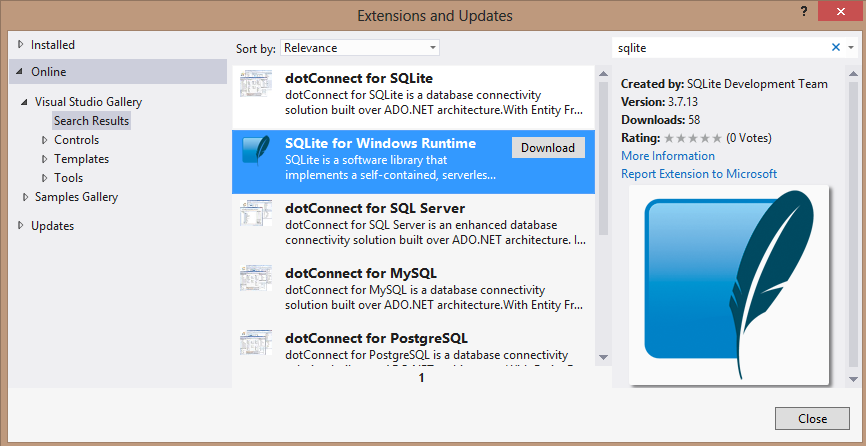
The first thing you want to do is install the package.  You can do this from within Visual Studio itself in all editions.  From the Tools menu, choose Extensions and Updates and then choose the Online section (on the left of the dialog) and search for ‘sqlite’ in the search term.  This will show you the SQLite for Windows Runtime package:

Read full article here

Tuesday, 7 August 2012

Building your own Windows Runtime components to deliver great Metro style appsFor Windows 8, we completely reimagined the platform, allowing you to choose the programming language and technologies you already know to build apps tailored to the device and form factor. With the Windows Runtime, you can even easily use multiple languages within a single app. You can build a great Metro style app with HTML and JavaScript that can interact with the Xbox 360 controller through building your own Windows Runtime component in C++. You can build reusable XAML controls exposed via Windows Runtime components that are instantly consumable by Metro style apps written in both C++ and C#. Essentially, we have let you build apps on the Windows 8 platform using the languages of your choice with no comprises. In this blog post, we talk about what you need to know to build your own Windows Runtime components.

For Windows 8, we completely reimagined the platform, allowing you to choose the programming language and technologies you already know to build apps tailored to the device and form factor. With the Windows Runtime, you can even easily use multiple languages within a single app. You can build a great Metro style app with HTML and JavaScript that can interact with the Xbox 360 controller through building your own Windows Runtime component in C++. You can build reusable XAML controls exposed via Windows Runtime components that are instantly consumable by Metro style apps written in both C++ and C#. Essentially, we have let you build apps on the Windows 8 platform using the languages of your choice with no comprises.

In this blog post, we talk about what you need to know to build your own Windows Runtime components.

Read full article here

Windows 8, XNA and MonoGame - Part 2, Getting Started

Windows 8, XNA and MonoGame - Part 2, Getting StartedIn part 1 of this series I gave you an overview of MonoGame, an open source cross platform implementation of the XNA namespace and class model and how you could use that to port you existing XNA code to Windows 8. In this article, I will show you how to get your development environment setup to support your porting effort.

         
Note: special thanks for Dean Ellis (dellis1972 ) who posted a video on YouTube outlining this process. I highly recommend that you view Dean’s video before you follow the steps below
Read full article here
Web Informer Button