Read those 5 points here
 Windows is the premiere development platform in the world. With Windows 8, developers can leverage their existing skills and code assets to create applications. Step into these virtual labs and learn how to build, share and sell interesting and easy-to-use applications that will make your customers happy. Virtual labs are simple – no complex setup or installation required.
What is a HOLO event? It’s an online event where you listen to a live presentation and work on lab exercises. As you work on your labs, Microsoft experts can assist and provide guidance by chatting with you one-on-one or by virtually taking control of your lab.
 Live tiles is one of the best things about Windows Phone and WinRT. I love how easy it is to add updates to your tiles in Windows Phone but hate how limited the updates are allowed to be. With WinRT comes a new API and more robust tile updates. There are many different types oftile updates and your app should support AT LEAST one square and one wide tile. If you’re like me (and I know I am), I started with theC# WinRT sample for App tiles and badges. I began looking at the code and could easily see that you use the TileUpdateManager to update your tile. The TileUpdateManager needs a TileNotification in order to update your tile. Here is where I quickly became lost in this rather complex sample. The TileNotification needs to be created with XML (an XmlDocumentto be exact) but I had not idea what XML elements are needed (Seriously, is all of the abstraction really needed here? This is suppose to be a simple sample to let devs see how to quickly and easily create a tile update). All I wanted to know was how to format the XML!
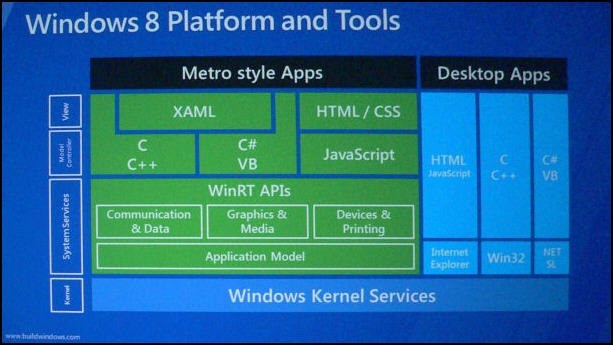 among WinRT, Windows 8, Metro, Metro Applications and etc.
