Pages

Showing posts with label XAML. Show all posts

Friday, 31 January 2014

Disable WebView scrolling in Windows Store Apps

WebView is a control which enables developers to host the HTML content. In WinRT framework WebView still lacks some features when we compare it to the WebBrowser of WPF. WebView class inherits from FrameworkElement class, but many properties of base class in not working in WebView.

Recently I was creating an app and I want to disable the horizontal & vertical scrolling of WebView. I tried below given code.

<WebView x:Name="webView" Source="http://myawesomewebsite.com"
    ScrollViewer.VerticalScrollBarVisibility="Disabled"
    ScrollViewer.VerticalScrollMode="Disabled"/>

But it didn't work. I was getting annoyed. I start binging & googling but didn't get any solution. WebView doesn't have its template also. Then I start analyzing the control in microscopic way. Finally I get to know that the scroll bars are due to HTML content, WebView itself doesn't have its own scroll bars. So I decided to go for JavaScript way. I applied some CSS properties in HTML content using JavaScript. It will display only that HTML content which is being displayed in current viewport or say display area. WebView provides InvokeScript method, which executes the specified script function from the currently loaded HTML, with specific arguments. When WebView's LoadCompleted event occurs, I am invoking that JavaScript which disables the scrolling. Check out whole code given below.

string DisableScrollingJs = @"function RemoveScrolling()
                              {
                                  var styleElement = document.createElement('style');
                                  var styleText = 'body, html { overflow: hidden; }'
                                  var headElements = document.getElementsByTagName('head');
                                  styleElement.type = 'text/css';
                                  if (headElements.length == 1)
                                  {
                                      headElements[0].appendChild(styleElement);
                                  }
                                  else if (document.head)
                                  {
                                      document.head.appendChild(styleElement);
                                  }
                                  if (styleElement.styleSheet)
                                  {
                                      styleElement.styleSheet.cssText = styleText;
                                  }
                              }";

void webView_LoadCompleted(object sender, NavigationEventArgs e)
{
    webView.InvokeScript("eval", new[] { DisableScrollingJs });
}

I hope this blog post will help you while developing WebView oriented app if you required such feature to implement.

Tuesday, 23 October 2012

Data Template Selector in Windows 8 Metro XAML App

Data Template Selector in Windows 8 Metro XAML App
It has been work around to have more than one data template in a list to display the data. In Windows 8 it has been eased, WinRT introduces the DataTemplateSelector class, where we could have more than one template to display in an items source control in Windows 8. In this article we would discover that.

To explore the sample, you definitely need Windows 8 Consumer Preview and Visual Studio 2012 RC.

Read More

Saturday, 20 October 2012

Creating your own file format to import .FBX, .OBJ and .X in your Windows 8 modern UI game (or 3D engine)


There is a lot of different file format when it comes to 3D objects. One of the most used is the FBX from Autodesk. This file format can be exported by all major DCC but the key point is that it can be complex for a game or 3D developer to open such file format.

I would like to propose here a solution that can allows you to easily offline files importation. The idea is to simulate a MSBuild execution to reuse the importation process of the XNA pipeline.

Read More

Using the MVVM Pattern in Windows 8

Expression Blend for Windows Store Apps with Design-Time Data Using the MVVM Pattern in Windows 8
Any programmer with previous experience in any of the XAML-based frameworks has probably at least heard of the Model-View-ViewModel (MVVM) pattern. Some have been using it extensively in all of their Windows Presentation Foundation (WPF), Silverlight or Windows Phone applications. Others have avoided it, either because they misunderstand what the pattern does, exactly, or because they don’t want to add what they see as a new level of complexity to their application.

Read More
Download the Code Sample

Tuesday, 16 October 2012

Callisto Dialog Helpers for Caliburn.Micro WinRT

Callisto Dialog Helpers for Caliburn.Micro WinRT
Callisto is excellent open source UI Control library for the Windows 8 Store apps. Caliburn.Micro is a powerful framework for building Windows Phone, Silverlight and Windows 8 Store apps. These helpers make it easies to combine Caliburn.Micro with the Callisto's dialogs.

Content
  • Helper for displaying settings dialogs on the Settings charm
  • Helper for displaying normal dialogs all around the screen
Read More
Get Library on CodePlex

Building a custom control using XAML and C#

Building a custom control using XAML and C#You may already know that one of the most powerful features of the Windows 8 XAML platform is the flexibility the platform provides to create custom controls. XAML provides features like Dependency Properties and Control Templates that make it easy to create feature-rich and customizable controls.

Read More

Monday, 15 October 2012

File Manipulation in Windows 8 Store Apps


File Manipulation in Windows 8 Store Apps
The IO Subsystem in WinRT has been written ground up to be completely async.In this article, we see how we can manage (Create and Update) binary data in Files using the Windows 8 runtime.

As we know now, Windows 8 Store Apps are a new category of desktop apps that are touch-centric and run on the new WinRT runtime on Windows 8. In this article, we see how we can manage (Create and Update) binary data in Files using the Windows 8 runtime.

Read More

Saturday, 13 October 2012

Secondary tiles with text


The call to pin a secondary tile looks like this:

SecondaryTile(string tileId, string shortName, string displayName, string arguments, TileOptions tileOptions, Uri logoReference);

The important part for this post is the last parameter: Uri logoReference. This is the the path to the image you want to show on the tile – but I had a problem, I didn’t want to show an image! I just had some text I wanted to show on the tile. After a lot of digging the solution was non trivial – generate an image at runtime. This was made even harder as the Render method in WPF does not exist in the XAML implementation used in WinRT.

Read More

Tips for Dealing with New and Missing Windows 8 XAML Controls


Although the Windows 8 XAML platform brings back a lot of the controls that exist in WPF and Silverlight, and adds some completely new ones, there are some controls that you might find missing and wonder what to do. In this article we cover a list of some of these controls, along with some suggested ways to cope with their loss.

Calendar
DataGrid
DatePicker
DockPanel
Flyout
GridSplitter
InkCanvas
Menu
MultiScaleImage
NumericUpDown
TabControl/Pivot/Panorama
TreeView
Viewport3D, D3DImage, DrawingSurface
WrapPanel

Read More

Saturday, 6 October 2012

WinRT/XAML Colour Picker (using SharpDx)

WinRT/XAML Colour Picker (using SharpDx)
I needed a colour picker for an app I’m building and it turns out no ones built a WinRT XAML one yet. So this is my very simple colour picker! I use bitmaps to represent the swatch (in my case i have 3 different types). I use SharpDx to get the “Pixel Buffer” of the selected swatch. Where ever the mouse or pointer is i get the pixel under that position via the pixel buffer and from that i get the colours (RGBA). This is what the colour picker looks like this.

Read More

Downloading files in Windows 8 apps using Background Transfer feature

In this blog post I am going to show how to use Background Transfer feature to download files over HTTP in a Windows Store C#/XAML app. Background Transfer has several advantages over using HttpClient and is much better for long running transfers. I am going to create a simple app, that initiates download over the Internet, tracks progress of the download and supports re-attaching transfers after the app is closed.

Read More

Simulating A Tab Control in a Windows 8 Application

I was looking through the forums on MSDN today and found someone asking how to implement a Tab Strip Control in Windows 8 Store applications.  They used the Store as an example, wanting functionality that behaves like the OverView, Details, Reviews section.

Currently there are no tab controls in Windows 8 and I haven’t seen any third party libraries implement one. I though I would put together  a quick post to show how you can get similar functionality using RadioButtons and the new FlipView control. I started with a blank application and added the following code to the MainPage.xaml.

Read More

Bing Maps SDKs for Windows Store Apps Now Available

Today we are announcing the availability of the Bing Maps SDKs for Windows Store apps. These SDKs will allow you to bring the power of Bing Maps to your Windows Store apps with support for C#, C++, Visual Basic and JavaScript based applications.

Please be aware that this release is the only version (1.1.20120927.0) of Bing Maps which will be supported for apps submitted to the Windows Store. If you are running any prior version (or BETA) you must upgrade and rebuild your app with this build to pass the Windows app Certification Kit (WACK) process. This process is required to submit all apps to the store and checks for the latest version of all dependencies to be approved. In most cases this should be as easy as downloading the latest version of the Bing Maps for Windows Store Apps API and recompiling your app.

Read More

The HealthVault Windows 8 SDK is now available

The HealthVault Windows 8 SDK is now available
HealthVault is the single repository of your entire medical life – across doctors, clinics, and years. HealthVault is a secure repository for you and your family’s medical and fitness data. It can be, at your control, shared with health providers or anyone you trust – but only if you want to. It can be integrated into applications and technology.

The library is for both JavaScript and C# applications.

Read More

Thursday, 4 October 2012

Creating a Direct2D game for WinRT

Creating a Direct2D game for WinRT
If you want to write a game for Windows 8 and was thinking of using XNA, think again. When creating games for Windows 8 you’ll have to go back to using DirectX. But don’t worry, with Visual Studio 2012 on Windows 8, you’ll get a lot of help doing so. Let’s have a look on how to create a Direct2D game for WinRT!

Read More

Modern UI Data Visualization Toolkit

Project Overview :
The main perpose for this is to build a set of reusable controls for Windows 8 Modern UI Development The Primary Release will contain the PieChart that I developed earlier on http://blogs.msdn.com/b/metroapps

Main Controls
- Pie Chart
- ColumnChart
- Line Chart

With support of Multi Series and Stacked Charts

Samples in Action:
http://download-codeplex.sec.s-msft.com/Download?ProjectName=modernuitoolkit&DownloadId=491376

Read More on CodePlex

Enhancing the Win8 Slider experience

Enhancing the Win8 Slider experience
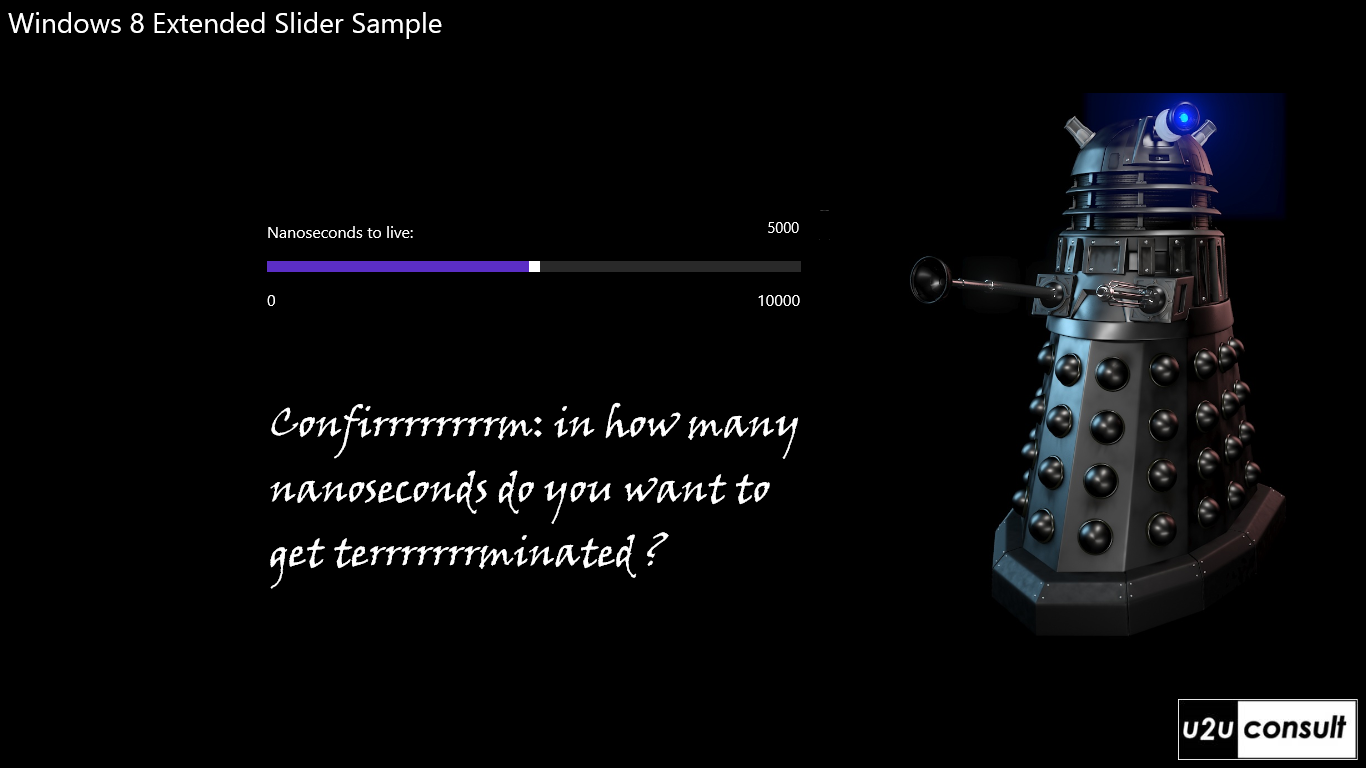
This article describes a way to enhance the user friendliness of a standard slider control in a Windows 8 Store App. Problem in a touch oriented application, we often allow -or force- the user to set the value for an integer or an enumeration through a slider control. In most cases this is more comfortable and less error prone than working with the soft keyboard. Unfortunately it’s not always ideal: if the range of values becomes too huge, or the slider becomes too narrow (e.g. when in portrait or snapped mode), then it becomes too difficult for the user to position the slider at the correct value. In this scenario, a textbox is a much more appropriate input control. This article proposes a UX design –and implementation- that offers the best of both worlds, and lets the end user decide on it.

Read More

Using Live SDK in Windows 8 – C#

Live SDK provides a set of controls and APIs that enable applications to integrate single sign-on (SSO) with Microsoft accounts and access information from SkyDrive, Hotmail, and Windows Live Messenger on Windows Phone and Windows 8.

Live SDK support several platforms such as: iOS, Android and of course Windows Phone and Windows 8 applications using C# and JS.

In this demo I’ll show how to use Live SDK with Windows 8

Read More

Thursday, 20 September 2012

Standard AppBarButton Styles Revealed For Windows 8 RTM


Standard AppBarButton Styles Revealed For Windows 8 RTM
As much for my own benefit as anyone else’s here are the icons that all exist within the “Segio UI Symbol” Font referenced in the Standard Styles XAML fragment of every new project.  (They should form the basis for any icon appearing in the Application Bar)

With thanks to Long Zheng for providing source code for easily  rendering the icons:
Read More

Getting started with SQLite in Windows Store / WinRT apps


Getting started with SQLite in Windows Store / WinRT apps
In this blog post I will expand the blog post by Tim Heuer  to include information on how to include and access a pre-populated SQLite database file, maybe even a file created by migrating from a SQL Server Compact database file, as I blogged about recently.

First, download the "SQLite for Windows Runtime" Extension via Tools/Extensions and Updates/Online. Restart Visual Studio.

Then add references to the SQLite and C++ extensions as described by Tim Heuer. Remember to change the Build Configuration to either x64 or x86 in Configuration Manager.

Read More
Web Informer Button