Pages

Sunday, 16 September 2012

Inspecting local and roaming settings for Windows 8 Store app

Inspecting local and roaming settings for Windows 8 Store app
ApplicationDataContainer class supports saving of complex hierarchies of local and roaming settings. Sometimes there is a need to verify saved values but unfortunately Windows 8 development toolset doesn’t include any settings inspector. This post describes a method for inspecting settings manually.

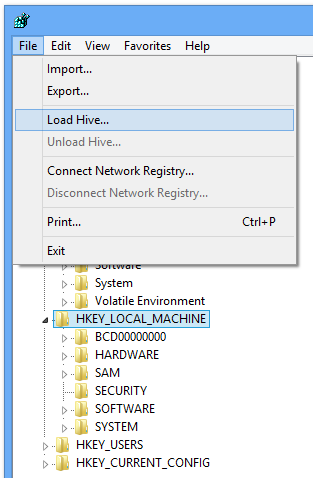
Application settings are stored in C:\Users\<user_name>\AppData\Local\Packages\<package>\Settings\settings.dat. settings.dat is a Windows NT registry file (REGF) and includes local and roaming settings. This file format, REGF, also known as Registry Hive File, is supported by Registry Editor.

To open settings file, close your app and open Registry Editor. Than select HKEY_LOCAL_MACHINE or HKEY_USER and open Load Hive dialog from File menu.

Read More

NFC on the Windows 8 Platform

NFC on the Windows 8 PlatformThe Proximity APIs enable you to create NFC apps for the Windows 8 platform. Designed to be easy to use and streamlined for the most common use cases, the APIs allow integrating powerful features into your apps in a very short time.

At the NFC Congress in Hagenberg, Austria, we’ve just presented the first overview of those APIs during our Developer Workshop that was opening the conference.

Read More

WrapPanel for Windows 8 WinRT

Out of the box, there's no WrapPanel available for WinRT. There's the VariableSizedWrapGrid, which you can use. But it doesn't work well with items that have different sized. Each item in the grid gets sizes based on the dimensions of the first item. You can see this behaviour in action here:

Searching for a good WrapPanel, I found one for Silverlight 2. Silverlight 2 did not have a native WrapPanel, so an open source WrapPanel was created by "Ineir":

Read More

Saturday, 15 September 2012

Windows 8: Windows Store apps and the WebView control


I recently started looking into creating a simple Windows 8, Windows Store app, that would contain a browser window and a setting somewhere to allow the URI to be modified.

The app itself is quite simple in concept so I figured it would be a breeze to implement for Windows 8.

To display a web page I needed to use a WebView control and I simply set the Source property to the desired Uri.

Read More
Web Informer Button