Pages

Showing posts with label Silverlight. Show all posts

Friday, 20 July 2012

Win8, WinRT, Metro, Oh My

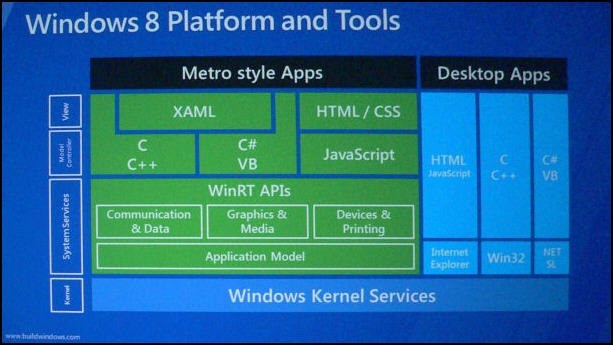
There has been a great deal of confusion about the differences between and Win8, WinRT, Metro, Oh Myamong WinRT, Windows 8, Metro, Metro Applications and etc.
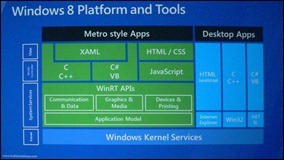
[ Click on the image for full size ]

While there is no reason to be absolutist or pedantic about these differences, if we are going to communicate effectively we need to understand the fundamental differences. 

Thus, I offer the following simplifications to get us started…

Read full article here
Thursday, 12 July 2012

The old new Hello World... Building a simple RSS reader for Windows 8 Metro with HTML and JavaScript

Writing a RSS reader used to be the new Hello World app (now I think it's writing a Twitter app, but anyway...) so when saw this great walk-through for creating a Metro Style App that consumes an RSS feed I thought it would make for a perfect Metro Monday post. Then when I saw the author was using the Channel 9 feed...!

The old new Hello World... Building a simple RSS reader for Windows 8 Metro with HTML and JavaScript


Starting from scratch, we’re going to learn through these 2 tutorials how to build a small RSS reader with HTML5, CSS3 and WinJS, the Microsoft JavaScript framework for Windows 8 Metro Style Apps. We’ll try also to follow the Metro design guidelines by using Expression Blend 5. If everything goes fine, you should be able to follow these 2 articles in 30 minutes.
This first article will help you to create the welcome screen that will use a WinJS ListView control. This control will display all the blog posts recently published via nice thumbnails. The 2nd one will work on the detail view displayed when you’ll click on one of the items. At last, you’ll find a video at the end of this article playing in real-time the following steps as well as the final solution to download. See them as useful complementary resources if you need to clarify some parts of this article.

Read full article here

Wednesday, 20 June 2012

WinRT vs. Silverlight - Part 0

I recently wrote a blog post series on how to share your code between Silverlight and WPF.

With the announcements of Windows 8 at the //BUILD/ conference and the new Windows Runtime (WinRT) which can be built against using C# and XAML I thought it appropriate to start a new series on how to make your existing Silverlight/WPF code run on WinRT. I'm mostly writing this as notes to myself and hope you will also find them useful. Personally I've already found a lot of issues with porting code over. Not that there are significant changes, but the documentation is very limited at this point, and the gotchas enough to make you waste a lot of time on resolving this. Hopefully this will act as a resource to get it working for you as well. Keep an eye on this post. I'll post new links as I go along learning new things about WinRT.

Generally what I have found is that with respect to XAML WinRT is more compatible to Silverlight than WPF, so expect it easier to use your Silverlight knowledge, and don't try and use WPF XAML features at this point. Things like DataTriggers etc. are not supported, and for the most part, the UI related methods in code are more similar to Silverlight than .NET 4 (note however that non-UI code is closer to the "original" .NET, since this is essentially the same CLR and compiler used).

Read full article here

Porting Silverlight or WPF XAML/code to a Metro style app

If you're familiar with other XAML-based platforms such as Windows Presentation Foundation (WPF), Microsoft Silverlight or Silverlight for Windows Phone, then you can re-use these skills to create Metro style apps for Windows 8 Release Preview. This topic lists high-level differences you should be aware of between programming on these different platforms.

Read full article here
Web Informer Button