Pages

Showing posts with label SQLite. Show all posts

Thursday, 20 September 2012

Getting started with SQLite in Windows Store / WinRT apps


Getting started with SQLite in Windows Store / WinRT apps
In this blog post I will expand the blog post by Tim Heuer  to include information on how to include and access a pre-populated SQLite database file, maybe even a file created by migrating from a SQL Server Compact database file, as I blogged about recently.

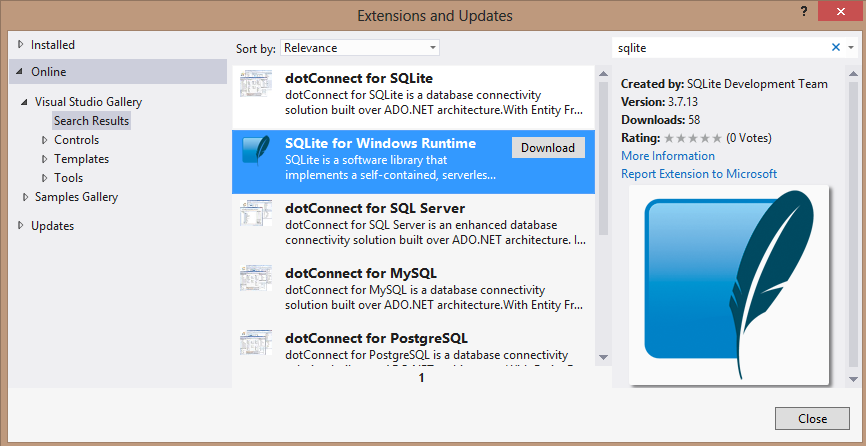
First, download the "SQLite for Windows Runtime" Extension via Tools/Extensions and Updates/Online. Restart Visual Studio.

Then add references to the SQLite and C++ extensions as described by Tim Heuer. Remember to change the Build Configuration to either x64 or x86 in Configuration Manager.

Read More

Monday, 17 September 2012

MetroLog - A lightweight logging system designed specifically for Windows Store and Windows Phone 8 apps


MetroLog is a lightweight logging framework designed for Windows Store and Windows Phone 8 apps. Although the API is based on NLog and log4net, the intention is that it's a very basic logging system.

The need for it to be basic comes from the fact that the Windows Store apps API surface area intentionally limited for very specific applications. This project came out of the fact that porting NLog to Windows Store apps is difficult because of it's incredibly rich feature set, most of which is not workable in Windows Store apps.

Read More

Thursday, 23 August 2012

Getting started with SQLite in Windows Store / WinRT apps


Getting started with SQLite in Windows Store / WinRT apps
In this blog post I will expand the blog post by Tim Heuer  to include information on how to include and access a pre-populated SQLite database file, maybe even a file created by migrating from a SQL Server Compact database file.

First, download the "SQLite for Windows Runtime" Extension via Tools/Extensions and Updates/Online. Restart Visual Studio.

Then add references to the SQLite and C++ extensions as described by Tim Heuer. Remember to change the Build Configuration to either x64 or x86 in Configuration Manager.

Now add the sqlite-net nuget package to the project, from the References node, select "Manage NuGet Packages" and search online for "sqlite-net"

Read full article here

The Unofficial Windows 8 Developer FAQ

Early this week I’ve been talking to a few current and former Microsoft staffers about all things Windows 8. In my discussions I’ve started to gather some gossip in around what happened to Silverlight and lastly the specifics around the DevDiv fall out between Steve Sinofsky and Soma.

It’s an entertaining read should I share the chat logs but what did struck me throughout the conversations was how much positivity Microsoft has been squandering due to petty internal squabbles or “dare not speak of that, for the overlord Sinofsky shall smite thee down for saying the nameless one outloud”.

Today, I’m going to attempt to dos something Microsoft staff should have done long ago or didn’t do correctly or simply were held back from doing so. I’m going to release the Unofficial FAQ on “What Just happened” in Microsoft for developer(s) worldwide.

Read full article here

Develop Windows 8 Apps without Windows 8? Yes, you can!


Develop Windows 8 Apps without Windows 8? Yes, you can!Windows is the premiere development platform in the world. With Windows 8, developers can leverage their existing skills and code assets to create applications. Step into these virtual labs and learn how to build, share and sell interesting and easy-to-use applications that will make your customers happy. Virtual labs are simple – no complex setup or installation required.

What is a HOLO event? It’s an online event where you listen to a live presentation and work on lab exercises. As you work on your labs, Microsoft experts can assist and provide guidance by chatting with you one-on-one or by virtually taking control of your lab.

BEFORE THE EVENT – Check to make sure the virtual lab works on your computer here


Here’s a link to the self-led labs: http://aka.ms/w8vlabs

Here’s a link to the expert-led labs: http://aka.ms/w8holo


Source : Jerry Nixon

Monday, 13 August 2012

Exporting SQL Server Compact to SQLite


The current available local relational database storage options on WinRT (Windows 8) are limited to SQLite (and maybe some others). Also on Windows Phone 8, both SQL Server Compact and SQLite will be available. So a natural path solutions currently based on SQL Server Compact will be to migrate to SQLite, and the first step would be to move the schema and data to a SQLite database.
I have therefore “bitten the bullet”, and the next version of the SQL Server Compact Toolbox,currently available for download in an alpha version, includes a feature to “dump” a SQL Server Compact database in SQLite .dump format.
Exporting SQL Server Compact to SQLite
Read full article here

Wednesday, 8 August 2012

UPDATED HOWTO: SQLite with Windows 8 apps

UPDATED HOWTO: SQLite with Windows 8 apps
The first thing you want to do is install the package.  You can do this from within Visual Studio itself in all editions.  From the Tools menu, choose Extensions and Updates and then choose the Online section (on the left of the dialog) and search for ‘sqlite’ in the search term.  This will show you the SQLite for Windows Runtime package:

Read full article here

Wednesday, 25 July 2012

Matthew Baxter-Reynolds' Programming Metro-style Apps Workshop (WINDOWS8-01-01)

Programming Metro-style Apps Workshops are a unique event in the UK designed to help developers get started on the road to building software for Windows 8 and Windows RT. We take you from the point of having done "Hello, world" and the basics and lift you up to the next level where you can start building real retail and line-of-business apps on the platform.


LEARN HOW TO:

We guarantee by the end of the session you'll have a firm understanding of Metro-style development on Windows 8 and Windows RT.

PROGRAMME     
  • How and why Windows was "reimagined"
  • The fundamentals of moving from .NET
  • Asynchronous programming
  • Sandboxing and protection
  • Unit testing
  • Working with SQLite
  • Sharing, search, notifications
  • Application lifetime and background activities
  • Packaging, private deployment, and store deployment
  • ...and more


Click here to register
Web Informer Button