Pages

Showing posts with label WCF. Show all posts

Thursday, 23 August 2012

The Unofficial Windows 8 Developer FAQ

Early this week I’ve been talking to a few current and former Microsoft staffers about all things Windows 8. In my discussions I’ve started to gather some gossip in around what happened to Silverlight and lastly the specifics around the DevDiv fall out between Steve Sinofsky and Soma.

It’s an entertaining read should I share the chat logs but what did struck me throughout the conversations was how much positivity Microsoft has been squandering due to petty internal squabbles or “dare not speak of that, for the overlord Sinofsky shall smite thee down for saying the nameless one outloud”.

Today, I’m going to attempt to dos something Microsoft staff should have done long ago or didn’t do correctly or simply were held back from doing so. I’m going to release the Unofficial FAQ on “What Just happened” in Microsoft for developer(s) worldwide.

Read full article here

Develop Windows 8 Apps without Windows 8? Yes, you can!


Develop Windows 8 Apps without Windows 8? Yes, you can!Windows is the premiere development platform in the world. With Windows 8, developers can leverage their existing skills and code assets to create applications. Step into these virtual labs and learn how to build, share and sell interesting and easy-to-use applications that will make your customers happy. Virtual labs are simple – no complex setup or installation required.

What is a HOLO event? It’s an online event where you listen to a live presentation and work on lab exercises. As you work on your labs, Microsoft experts can assist and provide guidance by chatting with you one-on-one or by virtually taking control of your lab.

BEFORE THE EVENT – Check to make sure the virtual lab works on your computer here


Here’s a link to the self-led labs: http://aka.ms/w8vlabs

Here’s a link to the expert-led labs: http://aka.ms/w8holo


Source : Jerry Nixon

Connecting Windows 8 applications with services: Part 2: Working with REST, oData and RSS from Windows 8 applications

Connecting Windows 8 applications with services: Part 1: Using services to get data in our Windows 8 applications

A REST (REpresentational State Transfer) service is based on some basic concepts of the web such as the HTTP protocol and the HTTP verbs (GET, POST…). When using a REST service, we need to send a request to a particular URL and a response will be returned. This response is unique, based on the URL: never should a specific URL return a different schema of the response. The best example of a REST implementation is the web itself: when we send a request to a particular URL, we’ll get back a response. Such a response is generally known as a resource in the REST terminology. The response is plain text, XML or JSON. The schema for this response can be seen as a contract: the service promises that the response will always be of the specified format. This way, we can write parsing code for the schema.

Read full article here
Download source code form here

Friday, 17 August 2012

Loading Image from WCF Service Dynamically Metro Apps


I found it really hard to solve this problem in Windows 8 when you want to Load Images Dynamically from Server Side using WCF to your Metro App since most of code snippets avaiable online will not work with Metro Apps

Basically here is the solution answer for you use the following snippets will solve your problem.

Read full article here

Monday, 30 July 2012

Working with OData and WinJS ListView in HTML5/JS Metro Style Application

In this post we will see how to consume Netflix OData feed in HTML based Metro Application. Movies information will be displayed as following. At the end of this post, we should have output as below,

Working with OData and WinJS ListView in HTML5/JS Metro Style Application

Netflix exposed all movies information as OData and that is publicly available to use. Netflix OData feed of movies are available at following location

http://odata.netflix.com/Catalog/

Essentially we will pull movies information from Netflix and bind it to ListView Control of WinJS. We will start with creating a blank application.

Read full article here

Working with GridView Control in WinRT C#/XAML Metro Style App

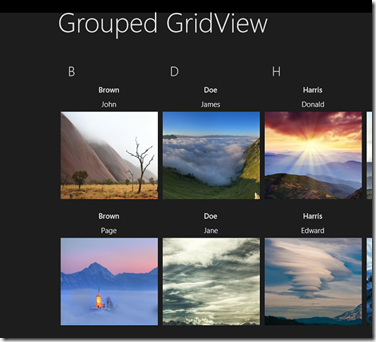
As I am continuing to learn WinRT and its component, I spent sometime learning new native controls that are available for use in Metro style applications designed for Windows 8.  One of those controls is GridView.  This control can be easily visualized by looking at Windows 8 start screen.  You see groups of tiles, scrollable horizontally.  This is what this control is all about: presenting a list of items in a horizontally scrollable container, which can be further grouped.  In the case of grouping, the control essentially just deals with list of lists.

Working with GridView Control in WinRT C#/XAML Metro Style App


In the example below I will be using data that comes from WCF SOAP based service.  It exposes a list of contacts, where each contract has just a handful of properties:

Read full article here
You can download the entire demo here

Monday, 23 July 2012

Metro Applications - FAQ

With the advent of Microsoft Windows 8, Windows Phone 8 and Office 2013, Microsoft is now all about Metro UI and Metro Apps. And when Windows 8 will be released, everybody will be developing or talking about Metro apps. But what is a Metro app and how to build these apps? There are many questions in the mind of many developers. Let’s just find answers for few of them in this blog post. 


Read full article here

Friday, 20 July 2012

Why MetroOAuth or C# Async makes life easier

Why MetroOAuth or C# Async makes life easierYesterday, I finally pushed some of the OAuth libraries I have been tinkering with. I have a really nice and simple library (and this simplicity seems to flow throughout the library). I decided to pull out some examples using my DropboxClient to show how much simpler a library can be.

Here’s how you log in to Dropbox (in c#):

Read full article here

Win8, WinRT, Metro, Oh My

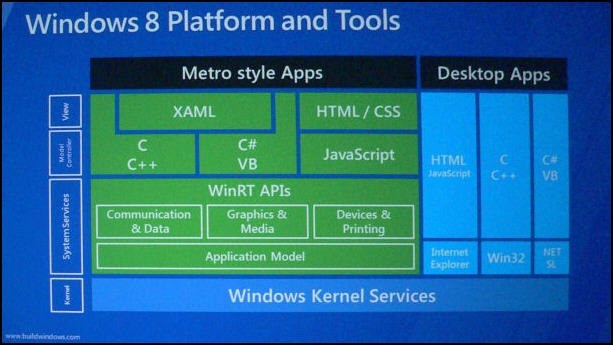
There has been a great deal of confusion about the differences between and Win8, WinRT, Metro, Oh Myamong WinRT, Windows 8, Metro, Metro Applications and etc.

[ Click on the image for full size ]

While there is no reason to be absolutist or pedantic about these differences, if we are going to communicate effectively we need to understand the fundamental differences. 

Thus, I offer the following simplifications to get us started…

Read full article here

Monday, 16 July 2012

Metro Revealed : Building Windows 8 apps with XAML and C# (Book Published By Apress)

The key features for developing on Microsoft’s eagerly anticipated Windows 8 operating system are unveiled in this fast-paced 80-pageprimer. Windows 8 contains the revolutionary Metro application framework for building dynamic and responsive touch-enabled applications that target both desktops and mobile devices.

Metro Revealed : Building Windows 8 apps with XAML and C# (Book Published By Apress)


 With the official release of Windows 8 looming ever closer, experienced author Adam Freeman invites you to take a crash course in Metro development. Using XAML and C#, he ensures you understand the changes that are being made to Windows development practices and puts you on the right course to creating innovative and elegant applications for this latest evolution of the world’s most successful operating system.

What you’ll learn

  • Create and configure Metro applications
  • Implement a touch-enabled user interface
  • Store data and application state using the Metro persistence model
  • Access remote data using Metro networking
  • Package and deploy your Metro application to the app store

Who this book is for

This book is for early-adopters of the Windows 8 operating system working with the Consumer Preview in order to be ahead of the curve in understanding the new ways of working that the operating system introduces.

Buy on Apress & Amazon

Wednesday, 11 July 2012

Consuming WCF SOAP Service in Windows 8 Metro Application

n this post we will consume WCF SOAP Service in C#/XAML based Metro Application. This is level 100 post showing basic steps to create simple WCF Service and consume that in Metro Application.

Very first let us create a WCF Service using VS2012. Form File menu create a new project by choosing WCF Service Application project template from WCF tab.

Consuming WCF SOAP Service in Windows 8 Metro Application


Read full article here
Web Informer Button