Pages

Showing posts with label Visual Studio. Show all posts

Tuesday, 23 October 2012

Microsoft DevRadio: Your Top Windows Store Questions Answered


Jerry Nixon welcomes Principal Program Manager Arik Cohen to the show as they discuss the recently launched Windows Store and a wide variety of topics developers ask most.

Read More

How to Test Your Windows 8 App Before Submitting to the Store

How to Test Your Windows 8 App Before Submitting to the Store
It’s always a good idea to test your application before submitting it to the store. The Windows Application Certification Kit (WACK) tool can save you from failing the early automated tests.

The first thing you’ll want to do is uninstall any existing build of your application. This is important because the WACK tool may fail if a previous debug build is still installed on the system. To uninstall your app, find it on the Start experience, right-click and choose ‘Uninstall’.

Read More

Saturday, 20 October 2012

Using the MVVM Pattern in Windows 8

Expression Blend for Windows Store Apps with Design-Time Data Using the MVVM Pattern in Windows 8
Any programmer with previous experience in any of the XAML-based frameworks has probably at least heard of the Model-View-ViewModel (MVVM) pattern. Some have been using it extensively in all of their Windows Presentation Foundation (WPF), Silverlight or Windows Phone applications. Others have avoided it, either because they misunderstand what the pattern does, exactly, or because they don’t want to add what they see as a new level of complexity to their application.

Read More
Download the Code Sample

Tuesday, 16 October 2012

Converting TimeZones in Store/WinRT apps

For anyone who’s tried to convert a DateTime/DateTimeOffset to another time zone in a Windows Store style app, I’ve put together a helper class that uses some of the Win32 APIs that are allowed in Store apps.

In the code below, I’m converting all times to be Eastern time, but it can be easily adapted more generically. I’m calling the Win32 functions that take changes in daylight time into account, so it should be accurate for any supplied date.

Read More

Saturday, 13 October 2012

TypeScript for Windows 8 Store Apps


What is TypeScript?
See http://www.typescriptlang.org

TypeScript was recently released and has become the new hot topic.  One of the questions I have asked and heard is can we use this for developing Windows Store Applications with Javascript and have the cool features that have been shown in the videos and examples.

One of the great features was the split window feature where you can code in TypeScript on the left and upon hitting save, it compiles to Javascript on the left. So I fired up a new Javascript Windows Store project in Visual Studio to give it a shot to see if it all works.  Before we get started make sure that you have the following:

  • Windows 8 & VS2012
  • Download the plugin: http://go.microsoft.com/fwlink/?LinkID=266563
  • VS 2012 Web Essentials: http://visualstudiogallery.msdn.microsoft.com/07d54d12-7133-4e15-becb-6f451ea3bea6


Read More

Tips for Dealing with New and Missing Windows 8 XAML Controls


Although the Windows 8 XAML platform brings back a lot of the controls that exist in WPF and Silverlight, and adds some completely new ones, there are some controls that you might find missing and wonder what to do. In this article we cover a list of some of these controls, along with some suggested ways to cope with their loss.

Calendar
DataGrid
DatePicker
DockPanel
Flyout
GridSplitter
InkCanvas
Menu
MultiScaleImage
NumericUpDown
TabControl/Pivot/Panorama
TreeView
Viewport3D, D3DImage, DrawingSurface
WrapPanel

Read More

Friday, 14 September 2012

Telerik Windows 8 UI Controls Release Candidate – Build Windows Store-Ready Apps at No Cost

Telerik Windows 8 UI Controls Release Candidate – Build Windows Store-Ready Apps at No Cost
Today we are pleased to announce the Release Candidate of Telerik UI Controls for Windows 8 development. One of the highlights of the release is the addition of two new controls, Pagination  and HubTile, for both HTML and XAML environments. In addition, the suite gets improvements such as Design-time support for XAML and numerous performance enhancements.

With this version of the suite (as well as with the previous Beta) you can build Windows store-ready apps at no cost. Hurry up, get your app to the store first; being first has huge advantages! There are already a number of certified apps on the Windows Store using the Telerik Windows 8 controls.

Read More

Thursday, 13 September 2012

Code Snippets for Windows Store Apps


In partnership with the Visual Studio team, we are launching Code Snippets for Windows Store apps, a collection of around 60 IntelliSense Code Snippets for common Windows Store app programming tasks. The snippets are available for Visual Basic, C#, C++, and JavaScript developers.

For example, if you don’t know how to copy a file in JavaScript or C++, just right-click, select Insert Snippet, select the code snippet, and it will automatically add the code to your Windows app as shown in the screenshots below.

Read More

Wednesday, 12 September 2012

5 points developers should know about WinRT/Windows 8

5 points developers should know about WinRT/Windows 8
Most of us already started developing for WinRT, so it make sense to have a better understanding of the run time. I am listing down few points with respect to WinRT, mainly from a developer’s perspective.

Read those 5 points here

Friday, 7 September 2012

Code Contracts tab in VS2012 – Odd way to get it enabled


Code Contracts tab in VS2012 – Odd way to get it enabled
I am a huge fan of the Code Contracts library which is now part of .net, in fact when I setup a new instance of VS it is one of the first plugins I install by default.  However, I was having some issues because even though I had installed the .msi I was not able to get the settings tab to show up in VS2012, in fact it was not in VS2010 either.  This was a bit odd to me because I had never had this issue.

In order to try to resolve this I decided I should uninstall the .msi and re-install it, so I set out to do this.  However, after doing this I still did not have the tab in either IDE, now I was perplexed.  Of course the first thing I did was to go out and search for the solution for this issue but nothing really popped out as ‘this is how to fix this issue’, however a few people did mention that they had to do a VS Repair install.  I thought this to be a bit extreme so I was not too keen to give this a try.

Read More

Embracing UI on demand with the app bar

Embracing UI on demand with the app bar
Creating a great app requires honing in on what makes your app best in its category and making that shine. Windows 8 provides tools like charms and app bars to make it easy to really focus on what makes your app best in class and minimize anything that distracts from it. Learn to use those tools and your app and your users will be able to really enjoy what makes your app great.

Read More

Thursday, 6 September 2012

Understanding and debugging design time data in Expression Blend


One of my favorite features in Expression Blend is the ability to attach a Visual Studio debugger to Blend. First let’s start by answering the question: why exactly do you want to do that?

Note: If you are familiar with the creation and usage of design time data, feel free to scroll down to the paragraph titled “When design time data fails”.

Creating design time data for your app
When a designer works on an app, he needs to see something to design. For “static” UI such as buttons, backgrounds, etc, the user interface elements are going to show up in Blend just fine. If however the data is fetched dynamically from a service (web, database, etc) or created dynamically, most probably Blend is going to show just an empty element.

The classical way to design at that stage is to run the application, navigate to the screen that is under construction (which can involve delays, need to log in, etc…), to measure what is on the screen (colors, margins, width and height, etc) using various tools, going back to Blend, editing the properties of the elements, running again, etc. Obviously this is not ideal.

Read More

Using WinJS & WinRT to build a fun HTML5 Camera Application for Windows 8 (1/4)


Using WinJS & WinRT to build a fun HTML5 Camera Application for Windows 8 (1/4)
Using HTML5, JavaScript & CSS3, we’re going to build a fun HTML5 camera application for Windows 8 and its Modern UI. You will learn how to use WinRT to access to the camera and the file system to take some pictures & videos. We will then work a bit on the layout with CSS3 grid & flexbox and provide some visual feedback to the user via CSS3 animations. I will also show you how to use WinJS and its FlipView control via a templating rendering JS function to embed the whole experience. At last, we will see how to manipulate the images taken with the camera to apply some filters effects via the canvas element or directly thanks to a C++ WinRT component.

Read More

Wednesday, 5 September 2012

Windows 8 Apps With HTML5


If you're an experienced Web developer, you'll love the HTML5/JavaScript/CSS3 options provided by Visual Studio 2012. Here's a step-by-step guide to getting started.

We now know that Windows 8 is coming on Oct. 26. That presents developers with a decision to make for building new Metro-style applications: HTML5 with JavaScript and CSS3, or XAML with C#, or Visual Basic with C++?

Many Web developers will choose HTML5/JavaScript/CSS3 because they already have experience with it. Once that decision's made, the next step is to understand Windows Runtime (WinRT) and how its new APIs interact with Windows 8. [As this issue went to press, Microsoft was considering changing the name "Metro" to something else, but hadn't yet decided on the new name. We're leaving it as "Metro" until a new name is officially chosen. -- Ed.]

This article takes you through the process of building your first HTML5/JavaScript/CSS3 Metro application. Let's get started.

Read More @ Visual Studio Magazine

Tuesday, 4 September 2012

MSDN Webcast Series - Building Windows 8 Metro Style Apps

MSDN Webcast Series - Building Windows 8 Metro Style Apps

Catch this on-demand MSDN webcast series to learn about the new platform for building Windows 8 Metro style applications. Get an understanding of the platform design tenets, the programming language choices, and the integration points with the operating system and across Metro style apps.

  • Designing apps with Metro style principles and the Windows personality
  • Building Metro style apps with XAML: What .NET developers need to know
  • What HTML developers need to know about coding Windows 8 Metro style apps
  • Win as One: How Contracts in Windows 8 Help You Build a Killer Metro App
  • Bring Your Windows 8 Metro Style Apps to Life with Tiles and Notifications
  • Introduction to the Windows 8 platform and the Windows store
  • Building Windows 8 Metro style casual games using HTML 5

Read More @ channel9

Friday, 31 August 2012

Creating a Simple Windows 8 Game with JavaScript: Part 1 – Windows 8 App Basics


Creating a Simple Windows 8 Game with JavaScript: Part 1 – Windows 8 App Basics
This is the first in a series of posts that will show you to create a (very) simple Windows 8 game. We’ll be using HTML5, JavaScript, WinJS, and some helpful libraries from CreateJS along the way.
The game is based on the XNA sample game "Catapult Wars Lab". We’ll reuse the assets from that game as we develop a new version for Windows 8 that’s based on web technologies. This game focuses on simplicity, so there are a number of intermediate techniques that aren’t used in this sample.

Read More On CodeProject

Getting Started: Authoring HTML For Windows 8 Apps Using Blend For VS 2012


Almost two years ago, we set out on a path towards building a flavor of Blend that allowed you to seamlessly craft HTML, CSS, and JavaScript into Metro style applications. We are thrilled to announce that the final, released version of Blend is available for you to try out. As in previous releases, there is no more need to download Blend separately. It is now part of every VS download that targets any of the supported platforms. You can learn more from our launch blog post.

Read More...

Getting Started: XAML Authoring With Blend For VS 2012


Getting Started: XAML Authoring With Blend For VS 2012

Now that you have your copy of Visual Studio 2012 including Blend, you must be raring to go and explore the world of Windows 8 development. We hope this post helps all the C#/VB & C++ junkies out there get started pronto on creating amazing apps for the Windows Store.

Who doesn’t like food? Trying to find the perfect recipe to cook for dinner is a decision we battle every day, so one of our sister teams in Microsoft had created this awesome Contoso Cookbook sample app. For the purposes of this post we will take this much loved sample application already oozing with design goodness and add a bit more styling and flair to it.

Download the Contoso sample app uploaded to accompany this tutorial.

Read More...

Thursday, 30 August 2012

My Favorite Visual Studio 2012 Features


I've grown fond of the following features in Visual Studio 2012.

Round Tripping Projects
Because Visual Studio 2012 doesn't convert solution and project files, you can use 2012 even when the rest of the team uses VS2010.

My Favorite Visual Studio 2012 Features
Finally!

Quick Launch
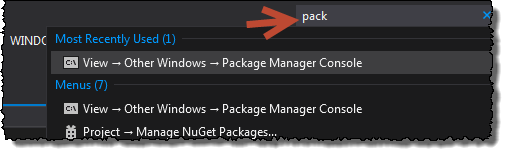
Even when you know where the option or menu item lives, it's often quicker to hit Ctrl+Q and type a few letters to find a command or option.

Found more from here

Wednesday, 29 August 2012

Building a Windows 8 app? Pick your favorite flavour!


When building an app for Windows 8, you have three programming models to choose from: .NET, HTML/CSS JavaScript, or C++

When I started coding, I quickly discovered that a big part of development was making choices. I also discovered myself frustrated when working with tools and platforms that did not give me choices and forced me down a specific path.

Read full article here
Web Informer Button