Pages

Tuesday, 17 July 2012

Windows 8 – Overriding Metro app resources

Once you’ve installed Visual Studio and explored the default templates one of the first things you’ll want to do from a design point of view is changing the application brush resources. Usually this will be to alter the teal or purple selection colour (depending if you’re using a Dark or Light theme) on most of the controls. The most common answer to this problem is re-template your control referring to your custom colours.

The simpler approach we’ve used at Marker Metro is the following, we’ll create a Colours.xaml resource dictionary, this’ll contain the Colour and Brush resources specific to the app we’re developing.  We typically reference this resource dictionary from the App.xaml.

Read full article here

Positioning Popup Menus in Windows 8 Metro

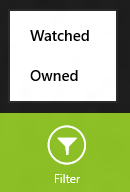
Often when building Windows 8 apps you'll want to provide a menu of options from the app bar, this may be a list of different ways to sort or filter the data. For these simple menus WinRT provides the PopupMenu control (for more complicated popup user interfaces I recommend the Flyout control from the Callisto library), these menus are very easy to create by creating UI Commands and appending them to the menus Commands collection.


Positioning Popup Menus in Windows 8 Metro


Read full article here

How to use Telerik Metro RadPieChart control in Windows 8 Metro App

When I first started developing for Windows 8 platform (XAML+C#) more than 2 months ago, I noticed that some of the controls that one would expect to see on a serious platform were missing. Mainly, I was missing charting controls and DatePicker control. I never expected the SDK to include charting controls, because I’ve never encountered those as a part of the official Microsoft SDKs, but controls such as a DatePicker should’ve been included for XAML developers, too (apparently, one is available for HTML devs). Luckily, I discovered Telerik Metro controls. Let’s see how to use the RadPieChart control and bind it to a ViewModel.

As I said, I first discovered Telerik controls while they were in the preview mode. Back then it was only available if you requested it via e-mail and waited a few days to be allowed in the program. Now they released the public beta with a much much better demo app and forum support. In the preview version, I had some trouble using the RadPieChart control to bind it to my ViewModel. The lack of documentation and initially support made it impossible to figure it out. Luckily, their forum is great so I got support after all, and now I’d like to share the solution with you.

Download the Telerik beta controls from their website:

http://www.telerik.com/products/windows-metro/overview.aspx

How to use Telerik Metro RadPieChart control


Read full article here

Getting your Metro game on with the MetroGameKit

Today's Metro Monday project is a little help getting you going in writing a HTML5/JavaScript Metro game. This kit provides a number of game writing examples without being overwhelming or over the top in complexity.

Space Cadet is a Windows 8 Metro Style App developed using HTML5 and JavaScript. The intent of this code is to help HTML5/JavaScript developers with writing their first Metro Style App in a fun, immersive way. The code for the game is intended for demo purposes only and should be considered a starting kit for future apps you may write.
The game includes a functional game loop as well as the following technologies:
  • HTML5 Canvas
  • HTML5 Audio
  • CSS3 Styling and Web Fonts
  • Implementing a Game Loop with JavaScript
  • Third Party Frameworks
  • Touch
  • Camera Access
  • Accelerometer
  • WinJS Controls

Getting your Metro game on with the MetroGameKit


Read full article here
Web Informer Button